
You don’t need a gaming PC to take mobile gaming seriously.
A decent smartphone can already handle games such as PUBG Mobile, Free Fire and other competitive titles. The problem is usually the controls. Touchscreen buttons can feel cramped, your hands can get uncomfortable during longer sessions, and the phone itself can become warm when you’re playing for a while.
That’s where mobile gaming accessories come in.
There are plenty of products available, but not all of them solve the same problem. A simple gaming trigger changes how you control the screen. A controller gives you physical controls. A phone cooler deals with heat. Gaming gloves are aimed more at hand comfort and touch response.
If you’re looking for mobile gaming accessories in Nepal, it makes more sense to identify the problem with your current setup first, then buy the accessory that addresses it.
Start With Your Playing Style
Before spending money on gaming accessories, think about how you actually play.
If you mostly play casually for 20 or 30 minutes, a small trigger or grip may be enough. Someone playing competitive shooting games for several hours has different requirements. They may care much more about physical controls, cooling and comfort.
The game matters too.
A player who mainly plays a shooting game may benefit from physical triggers, while someone playing games that depend heavily on joysticks may prefer a controller. There is no reason to add five accessories to a phone when one solves the problem.
Gaming Triggers: A Simple Upgrade for Touch Controls
Gaming triggers are among the simplest mobile gaming accessories.
They add physical buttons over selected touchscreen controls. Instead of repeatedly tapping the screen with your finger, you can use the trigger to activate the corresponding touch control.
Nephot’s PUBG Mobile Gaming Trigger Fire Button is listed at Rs. 349 and uses a D9 design. The product is listed as compatible with iOS and Android phones from 4.7 to 6.4 inches and is intended for PUBG and other FPS games.
This type of accessory makes the most sense if your main complaint is that touchscreen controls feel awkward.
It’s also inexpensive and small enough to carry with your phone accessories.
But placement matters. The trigger needs to line up correctly with the game’s touch controls, and the fit can vary depending on the phone. Nephot’s product information also notes that performance depends on factors such as the phone’s touchscreen sensitivity, game settings and trigger positioning.
So don’t expect a trigger to magically improve your aim. It changes the physical input method. Your actual improvement will still depend on how comfortable you are using it.
When a Mobile Gamepad Makes More Sense
If you want more physical controls than a couple of triggers provide, a gamepad is the next step.
A gamepad can give you buttons, triggers and other physical controls that aren’t available through the normal touchscreen layout.
Nephot’s 5 in 1 PUBG Gamepad is listed at Rs. 1,099. The product description describes it as a mobile gaming accessory intended for PUBG and similar battle-royale games, with physical controls designed to provide an alternative to touchscreen input.
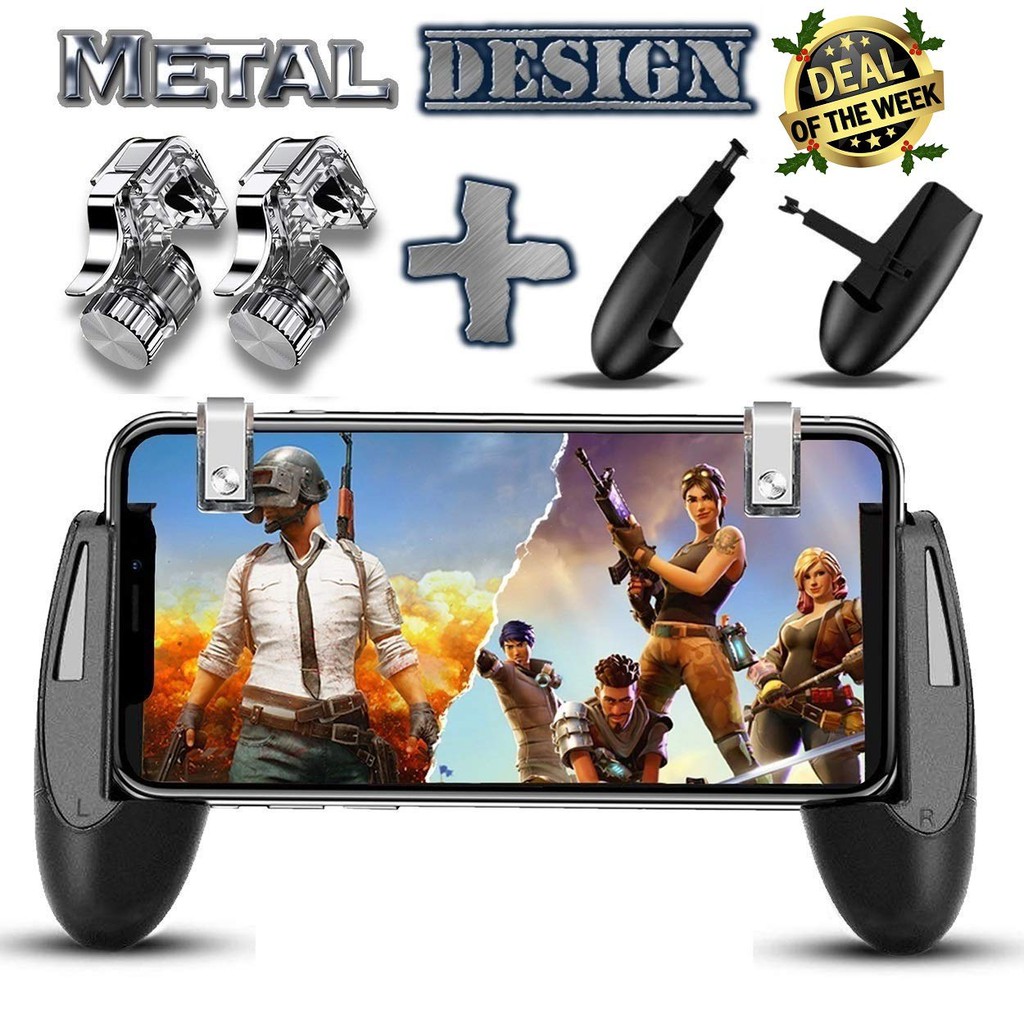
The same product page highlights factors worth checking when choosing a mobile gamepad, including compatibility, layout, ergonomics, portability and additional features such as cooling fans or phone mounts.
That last part is important.
A controller can have plenty of buttons and still be uncomfortable if your hands don’t sit naturally around it. If possible, look at the controller’s dimensions and design before buying rather than choosing based only on the number of buttons.
Cooling Accessories for Long Gaming Sessions
Phone temperature becomes more noticeable during longer gaming sessions.
Games that put heavier demands on the phone can generate additional heat, especially when you’re playing continuously. A phone cooler is designed to help with that problem by attaching to the back of the phone and actively cooling the device.
Nephot currently lists several magnetic gaming phone coolers, including the PIVA Iceblade X30 Magnetic Phone Cooler, listed at Rs. 1,875, as well as MEMO CX14, CX20 and CX08 models.
The PIVA model is listed as a 27W gaming fan, while the MEMO models are listed with different power ratings and cooling designs.
Cooling isn’t something every mobile gamer needs.
If you normally play short sessions and your phone doesn’t get particularly warm, buying a cooler may not make much sense. If you regularly play demanding games for extended periods and heat is already becoming an issue, it is a much more relevant accessory.
Also check how the cooler attaches to your particular phone before ordering. Magnetic attachment, phone case thickness and device compatibility can affect whether a cooler is practical.
Gaming Gloves Are About Feel and Comfort
Gaming gloves are a more specific accessory.
They are generally aimed at players who want less friction between their fingers and the screen, particularly during long touchscreen gaming sessions.
Nephot lists Gaming Gloves for PUBG at Rs. 799. The product is specifically positioned as gaming gloves for PUBG and includes sweat-related features in its product tags.
This kind of accessory is most relevant if sweaty fingers or friction are affecting your touchscreen controls.
It’s not essential gaming equipment. But for someone who already knows that their hands become uncomfortable or slippery during longer sessions, it can address a very specific problem.
All-in-One Kits Can Be Convenient
If you’re starting from scratch, buying individual accessories isn’t always the simplest option.
Nephot’s 5-in-1 Mobile Game Combo Pack is listed at Rs. 3,099 and combines several mobile gaming accessories, including gaming triggers, controller-related accessories and a cooling fan. The product page also describes it as compatible with most Android and iOS smartphones.
A combo can make sense when you genuinely want several accessories.
But don’t assume a larger bundle automatically offers better value.
If you only need a trigger, buying an entire kit adds unnecessary products. Likewise, if your main issue is phone heat, a dedicated cooler may be more relevant than a bundle containing accessories you won’t use.
Think about the individual components, not just the “5-in-1” label.
What About a Gaming Mouse and Mouse Pad?
Not every gaming setup revolves around a phone.
If you also play games on a computer, basic peripherals can make a bigger difference there.
Nephot’s gaming category currently includes the FANTECH Z2 Gaming Mouse and the HADRON HD-G7 Game Player Mouse and Mouse Pad. The category also includes an XXL 90 × 30 cm desk mouse pad.
The 90 × 30 cm XXL mouse pad is designed to provide space for both a keyboard and mouse, with a rubber base and smooth fabric surface.
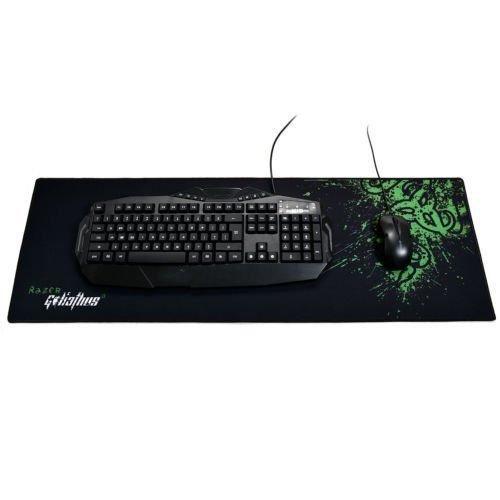
This is worth considering if your gaming setup switches between mobile and PC. A large mouse pad isn’t a mobile gaming accessory, but it can be useful when the same desk serves as both a gaming and study or work space.
How to Choose Mobile Gaming Accessories in Nepal
Don’t start with the most expensive accessory you can find.
Start with the problem.
Your touchscreen controls feel uncomfortable:
Try a gaming trigger or a suitable gamepad.
You want physical controls:
Look for a mobile controller or gamepad and check compatibility carefully.
Your phone gets hot during long sessions:
Consider a dedicated phone cooler.
Your fingers become sweaty during gaming:
Gaming gloves may be worth considering.
You want several accessories at once:
Compare a complete gaming kit with the cost of buying only the components you actually need.
There’s also the issue of phone compatibility. Screen size, phone shape, ports, Bluetooth support and the way an accessory physically attaches to the device can all matter.
Don’t assume that an accessory described as “universal” will be equally convenient on every phone.
Don’t Buy Accessories Just Because They’re Made for Gaming
A product having RGB lights, multiple buttons or a gaming label doesn’t automatically make it useful.
Ask what changes after you buy it.
If a trigger gives you a more comfortable way to access an important control, that’s a clear benefit. If a phone cooler helps manage heat during your long sessions, it has a practical purpose. If a controller feels uncomfortable in your hands, its extra buttons won’t matter much.
This is particularly relevant when shopping online because gaming accessories can look impressive in product photos.
Check the dimensions, compatibility and actual features before placing an order.
A Practical Setup for Different Players
You don’t necessarily need the same setup as another gamer.
For casual mobile gaming, a simple trigger can be enough.
For regular FPS players, a trigger or mobile gamepad may make more sense, depending on how you prefer to control the game.
For long gaming sessions, consider whether heat and hand comfort are already problems. That’s where a phone cooler or gaming gloves become more relevant.
For someone building a more complete mobile setup, a combination of physical controls, cooling and comfort accessories may make sense, provided the phone supports them.
Nephot’s Gaming category currently contains 10 listed products, including mobile gamepads, gaming triggers, gaming gloves, controllers, gaming mice and mouse pads.
That gives you a starting point for comparing different types of accessories rather than treating every gaming product as interchangeable.
Before You Order
Take a minute to check your phone model and the accessory’s compatibility.
For a trigger, check the screen size and whether its placement works with your game’s controls. For a controller, check the connection method and device compatibility. For a cooler, check how it attaches to the phone and whether your case will interfere with it.
And if you’re ordering several accessories, think about how they will work together.
A phone cooler that occupies the same area where a controller grips the phone isn’t particularly useful. A thick phone case can also interfere with accessories designed to attach directly to the device.
Small details like these are easy to overlook until the package arrives.
Build the Setup Around the Game, Not the Other Way Around
Mobile gaming accessories are most useful when they solve a real problem.
You don’t need a huge collection of gaming gear to enjoy PUBG, Free Fire or another mobile game. A single inexpensive trigger may be enough for one player, while another may genuinely benefit from a controller and cooling setup.
The sensible approach is to identify what is limiting your current setup, check which accessory addresses it, and then compare compatibility and price before buying.
Nephot’s gaming accessories collection includes several types of mobile and general gaming products, making it possible to compare different options rather than choosing an accessory solely because it is marketed as a gaming product.